
The travel itinerary app with an AI assistant that never sleeps.
Your whole trip, already in hand.
TripFumi is the travel itinerary app and trip organizer for iPhone and Android. Meet Fumi, your AI travel assistant. It brings your plans together, remembers your preferences, spots the gaps, helps you book flights and hotels, and has your back when plans change.

Start free today
Free to download. In-app purchases available.

Scan to install on your phone




Organize all your travel plans beautifully.










Bring the trip together
Forward your bookings. Get your whole itinerary.
Forward a booking email or share a photo or PDF. TripFumi organizes flights, hotels, meetings, and more into one itinerary, giving you and Fumi a clear picture of the journey ahead.
Get TripFumi on iPhone or Android
Forward a booking to plans@tripfumi.com
Open a trip that’s already organized



Less inbox. More itinerary.
One confirmation is all it takes.
Confirmations automatically build the plans you need, all together. Upload a booking confirmation or forward it to plans@tripfumi.com.
plans@tripfumi.comWe don’t sell your personal information or use your content to train third-party foundation models. Read our privacy policy.
Keep up with booking changes. Forward an updated confirmation to bring the new details into your itinerary.
One place for the details. Keep times, addresses, confirmation codes, and supporting documents alongside the plans they belong to. No digging through your inbox when you need an answer.
Book with Fumi
Fumi finds your favorite flights, hotels, and restaurants instantly; at prices you’ll love!
Say where and when, and Fumi comes back with flights and hotels that fit your preferences and budget, without the tabs. Fumi fares and Fumi prices are live rates, ready to book. Book in TripFumi and the times, addresses, and confirmation codes are already in the right trip. See everything you can book.

Search with Fumi
Tell Fumi where and when. Compare current flights, hotels, and places to eat that match how you travel. Save your picks to the itinerary, and book flights and hotels right inside your trip.
Live rates, ready to book.
- Fumi fares · flightsLive fares from 600+ airlines, narrowed to how you fly.
- Fumi prices · hotelsLive rates on more than 3 million places to stay.


When your price beats the public one, you see it.

Fumi price!Shows up when your TripFumi price beats the public price, with the public price crossed out.
Before you go
Catch what’s missing before you leave.
Fumi checks the trip you’ve built against how you travel: a hotel for every night, enough time between flights, the airport transfer you forgot. Each new trip starts closer to done. Want the whole trip planned for you? Try the AI trip planner.
Spend less time planning.
Tell Fumi how you like to travel, so you don’t have to start from scratch each time you plan. Your preferences, remembered.




Get a head start on familiar trips.
Ask Fumi to remember your favorite hotel or usual flight route. Reuse a saved itinerary on new dates, then find current options without re-entering the same trip details.
‘Why do I feel like I forgot something?’
Fumi checks your itinerary for missing hotel nights, tight connections, mistaken overlaps, and missing transfers. Fumi flags missing plans and conflicting details before they disrupt your trip.
While you’re away
When a flight changes, you know before the gate does.
Get flight delay alerts, plus cancellations and gate changes, for every flight in your trip. Fumi helps you understand what they mean for the rest of your trip and explore your options, giving you more time to act.
See the delay before it reaches your gate.
Follow your incoming aircraft, spot tight connections, and check recent flight performance alongside your travel plans.



Conquer the airport maze.
Find coffee, food, shops, and lounges near your gate. Filter Airport Places or ask Fumi where to go, with gate locations and estimated walking times.
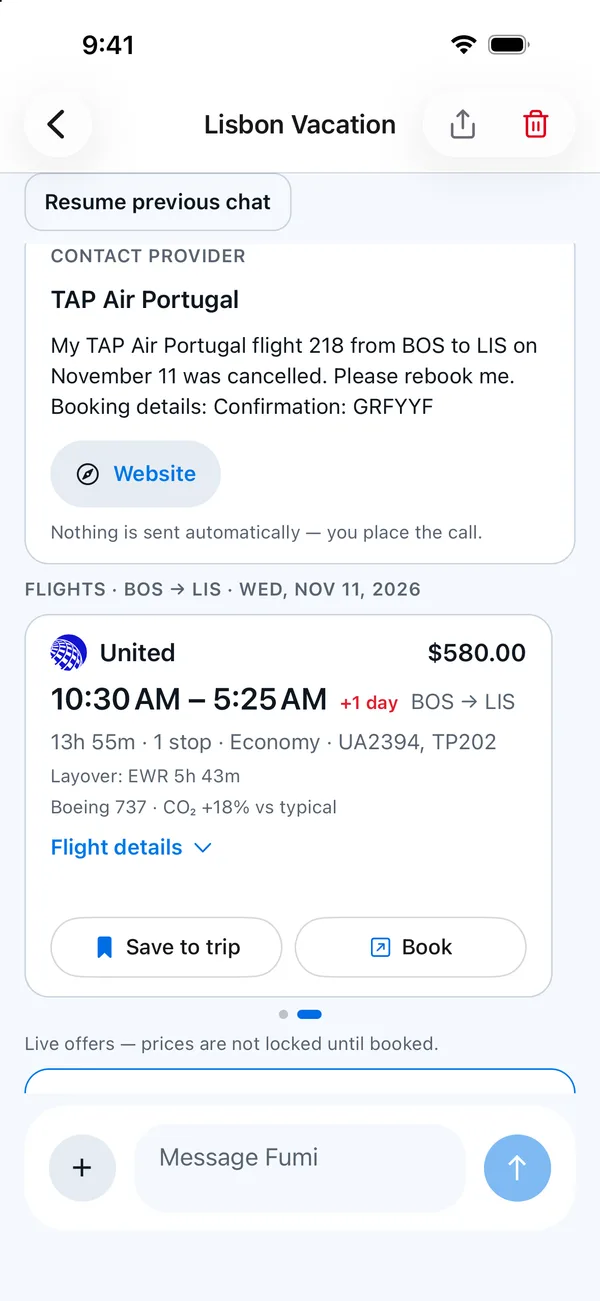
When a flight is cancelled, Fumi gets to work.
Fumi drafts the request to the airline with your booking details, lines up same-day alternatives, and lists what else in your trip needs a look. You place the call; nothing is sent for you.
Keep people connected
The right people, in the loop.
Share your itinerary with friends, family, a colleague, or an assistant. Give them a clear view of your plans and choose whether they can simply follow along or help keep the trip organized as a trip editor.



Lisbon Vacation
Nov 11–18 · invitations pending
What about your regular travel crew? You can automatically add them as travelers or observers to every new trip you create.

Share a view or a helping hand.
Choose who can view the itinerary and who can edit it.
Keep fellow travelers informed.
Travelers can receive flight alerts, while observers can follow the itinerary without day-of-travel notifications.
Cut down on the back-and-forth.
Keep shared travel details together instead of sending another screenshot or forwarding another itinerary.
Less to sort out later
Trip money stays with the trip.
Snap a receipt, forward a confirmation, or tell Fumi what you spent.
Capture it while it’s fresh.
Snap or forward a receipt and let TripFumi extract the details.
Know where your money went.
Ask Fumi what you’ve spent on a trip, without adding up receipts yourself.
Keep shared costs clear.
Split expenses and record payments when you’re traveling together, without keeping a separate spreadsheet of who owes what.
See who paid what.
The trip summary shows total spend, your share, and who still owes whom, in the trip’s currency.
Beyond this trip
See how far you’ve come.
See the countries, cities, miles, and days that make up your travel history. Atlas keeps a record of where you’ve been, ready whenever you want to look back.
Questions, answered
What does a travel itinerary app do?
It keeps every flight, hotel, train, car and reservation of a trip in one day-by-day timeline. With TripFumi you forward your booking emails and it builds the itinerary for you, and Fumi, your AI travel assistant, checks it for gaps before you leave.
Is TripFumi available now?
Yes. TripFumi is available on the App Store for iPhone and Google Play for Android.
How is TripFumi different from TripIt?
Both organize the bookings you forward. TripFumi adds Fumi, an AI assistant that checks your trip for gaps, helps when plans change and remembers how you like to travel. See how TripFumi works as a TripIt alternative.
Is TripFumi a trip organizer app?
Yes. TripFumi is a travel itinerary and trip organizer app for iPhone and Android: forward your bookings and it builds your trip, with Fumi to help along the way.
Does Fumi book or change reservations for me?
Fumi helps you book flights and hotels: it finds options that fit you, and you book and pay right in the app, with the booking going straight into your trip. For restaurants, Fumi finds a table and you reserve it on the restaurant’s booking page. If plans change, just ask Fumi.
How does TripFumi get my trip details?
Forward your booking confirmations or share a photo or PDF. TripFumi organizes the details into plans and adds flight updates when available.
What happens to the confirmations I send?
TripFumi processes your confirmations and attachments to organize your travel details. We use service providers, including AI providers, to help provide these features. We don’t sell your personal information or use your content to train third-party foundation models. See our Privacy Policy for details about processing, sharing, and deletion.
Can I use TripFumi offline?
Your saved itinerary stays available offline. Files added to your trip are automatically synced to your phone for offline access. Live updates, new searches, and replies from Fumi require an internet connection.
How do Free Trips and Premium work?
Every account gets two Free Trips without a subscription or automatic charge. A trip you own counts toward your two once it is created, unless you delete it within 24 hours. Every flight or hotel you book unlocks one more free trip in TripFumi. A free trip is one more trip you can plan and organize in TripFumi, with every feature included and no Premium needed. It doesn’t pay for your travel. Cancelled bookings don’t count. Premium adds more trips, longer trips, more Fumi messages, and other features. The app shows plans and prices before you subscribe.
Focus on why you’re going.
Let TripFumi help with the details along the way. Less to keep in your head.
Start free today
Free to download. In-app purchases available.
Scan to install on your phone